As marketing analysts, advertising agency owners, and advertisers, you are constantly searching for effective and efficient ways to monitor user activity and gather data to improve your services. One such technique that has gained traction in recent years is server-side tagging. In fact, server-side tagging is becoming increasingly important in the evolving, privacy-first and cookieless internet.
Despite not being a new concept, server-side tagging has been gaining popularity in recent years, thanks to its numerous advantages over traditional client-side tracking methods. Before you take a decision regarding its implementation, it is essential to understand the purpose and benefits of server-side tagging, and how it can transform the way we collect, analyze, and optimize data for our businesses.
In this article, we will explore what server-side tagging is, its basics, its technical aspects, and a real-life example to illustrate its applications and impact. We'll also discuss how it addresses some of the most critical issues in the digital advertising and marketing industry, from data accuracy to privacy compliance in a modern tracking environment.
Let us learn how server-side tagging will put accuracy, reliability, and privacy at the heart of digital marketing and analytics
What Is Server-Side Tagging?
Server-side tagging (SST) is an alternate technique for monitoring user activity and gathering data to improve services by embedding tags, scripts, or snippets of code into a website or mobile application.
Like client-side tracking, SST involves embedding tags, scripts, or snippets of code into a website or mobile application. However, SST has a crucial difference. It involves a cloud server container in the process, which takes control away from third parties like Google and Facebook and hands it to you, the website owner or operator.
In simple words, the fundamental concept is identical to that of client-side tracking but with one key difference. A cloud server container is inserted into the loop.
Rather than sending event data directly to analytics services, SST sends data first to a server-side Google Tag Manager (sGTM) and then to the chosen analytics services. This approach ensures that the code is executed on the server rather than in the user's browser, reducing page load times and safeguarding sensitive user information.
Server-side tagging emulates client-side tracking to a large extent, with the primary difference being the addition of a cloud server between the client and the tag manager. Google Tag Manager's Server-Side Tagging allows businesses to move measurement and advertising tags off their websites and into secure server containers. This not only protects customer information by restricting access but also helps improve performance by reducing page load times.
With the integration of Server-Side Tagging into various Google products and services, businesses can now move more tags off their websites and achieve better site performance. Server-Side Tagging is compatible with any cloud or server provider that supports Docker, an open-source platform for developing and running applications, and is available to customers in Google Tag Manager and Google Tag Manager 360.
Google has extended Server-Side Tagging support to include Google Ads and Google Marketing Platform products like Campaign Manager 360, Display & Video 360, and Search Ads 360. Previously, businesses had to use a separate client-side tag for each marketing product, which ran directly on their websites.
Now, a single client-side tag can activate multiple tags for these products directly in the server container when customers interact with a website. This results in fewer tags on the site, improving page load times and overall performance.
Google Tag Manager has introduced a new Server container type that resides in a cloud environment with server-side tagging. The primary purpose of this setup is to create an endpoint in a server environment that you own, acting as a proxy between the hits sent from browsers and devices and the actual endpoints that collect the hits.
The Server container operates as an HTTP API endpoint, allowing any browser, device, or other sources supporting the HTTP protocol to send requests. Ideally, this endpoint would be mapped with a custom subdomain in the same domain hierarchy as the website sending the requests. This ensures that requests happen in a first-party context, which significantly impacts how cookies and identifiers can be read and written.
Within the Server container, workers called Clients are configured to listen for incoming HTTP requests, parse them into a unified event format, and run a virtual container with the event data object. Tags, triggers, and variables in the container react to the event push in a manner similar to how they would with a regular Google Tag Manager setup. Tags take the information in these event data objects and build the actual requests that are sent to endpoints like Google Analytics or Google Ads for data collection and processing.
As the digital world continues to evolve, the need for efficient, secure, and reliable ways to manage data and optimize website performance has become increasingly important. Server-side tagging is a powerful solution that can address these needs.
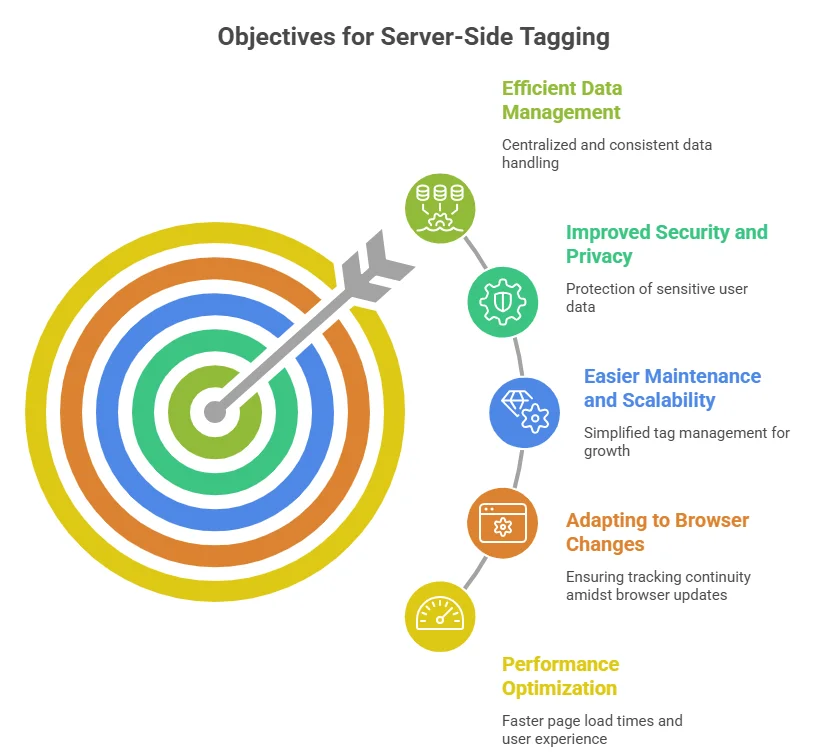
One of the primary needs for server-side tagging arises from the necessity to optimize website and application performance. When tags are executed on the client side, they can increase page load times and negatively impact user experience. By moving tag processing to the server side, the burden on the client is reduced, resulting in faster page load times and a smoother user experience.
Data privacy and security concerns have taken center stage in recent years, with regulations like GDPR and CCPA shaping how businesses handle user data. Server-side tagging enhances security and data privacy by allowing sensitive information to be processed on the server rather than exposing it on the client side. This ensures that data is less vulnerable to unauthorized access and supports compliance with evolving privacy standards.
Managing and maintaining data consistency across multiple platforms and tools can be challenging. Server-side tagging simplifies this process by centralizing tag management and execution. By processing data on the server side, you can ensure that your data is consistent and accurate across different marketing and analytics tools.
As websites and applications grow, so does the complexity of managing tags and associated code. Server-side tagging makes maintenance and scalability easier by centralizing tag management. By offloading tag processing to the server, you can update or modify tags without directly impacting the client-side code.
Modern web browsers are constantly evolving, and many of these changes impact tracking capabilities. For example, browsers like Safari and Firefox have implemented strict tracking prevention features, while others are moving toward limiting third-party cookies. Server-side tagging helps you adapt to these changes by processing data on the server, ensuring more consistent tracking across environments.
In today's rapidly changing digital landscape, server-side tagging has become a crucial tool for optimizing performance, ensuring data privacy and security, and simplifying data management. By moving tag processing from the client side to the server side, businesses can improve user experience, comply with data protection regulations, and streamline their tracking infrastructure.
The server-side container functions as a proxy, relaying information between browsers and devices and the real endpoints that receive the data. It serves as a protective data filter between your users and third-party vendors seeking to collect data.
Workers and Clients are Docker images with distinct roles. They are set up inside the Server container to listen for incoming HTTP requests, parse them into a common event structure, and run a virtual container with the event data object.
The server-side container functions as an HTTP API endpoint, allowing any browser, device, or other source that supports HTTP to send requests. These are then parsed into a common event structure and processed within the container.
In practice, the endpoint for the server-side container is mapped to a custom subdomain within the same domain hierarchy. This ensures that requests occur in a first-party context, which has important implications for how cookies and identifiers behave under modern browser restrictions
Imagine an e-commerce website called Toto Tools that wants to track user behavior and improve its marketing strategy. With server-side tagging, Toto Tools can set up a server-side container that acts as a proxy between user browsers and analytics services.
As users interact with the website, their activity data is sent to the server-side container, which processes the data and forwards it to selected analytics tools. This allows the business to gain insights while maintaining better control over data and user privacy.
Server-side tagging also enables Toto Tools to filter and customize the data before sending it to third-party services. For example, it can remove sensitive information, aggregate data, or enrich it with additional context.
By communicating these privacy and data handling improvements, Toto Tools can build stronger trust with its customers.
Server-side tagging executes code on the server rather than in the user's browser, reducing page load times while protecting user information.
Server-side tagging shifts control from third parties to the website owner by centralizing data handling within a controlled server environment.
The server-side container acts as a filter between users and third-party vendors, ensuring that only relevant and necessary data is shared.
By filtering data through a controlled environment, server-side tagging helps protect sensitive user information and supports responsible data usage.
Server-side tagging enables a stronger first-party data strategy, helping businesses maintain more reliable tracking even as browser restrictions increase.
Server-side solutions rely on cloud infrastructure, making them highly scalable and adaptable to changing traffic demands.
Since it operates as an HTTP API endpoint, server-side tagging allows any compatible device or system to send data efficiently.
Server-side tagging is a powerful technique for monitoring user activity and gathering data to improve your services. By understanding its basics, technical aspects, and terminology, you can make informed decisions about whether this approach is suitable for your business.
It is important to note that implementation may require technical expertise and careful planning to ensure a successful transition.