Out of the total websites in the world, more than 40% are built using WordPress. That’s a huge number for any CMS platform and hence, there is a great chance that your website is built using WordPress. Also, you probably use the WordPress Contact Form 7 plugin for your website's contact us form.
An optimized GA4 setup ensures the quality of your data, allowing you to craft strategies that truly resonate with your audience.
This blog provides a comprehensive walkthrough of conducting an effective GA4 audit, ensuring your data collection and interpretation are both accurate and relevant, empowering your business to thrive online.
A GA4 audit is like a health check for your digital strategy. It's a systematic review of your GA4 setup to ensure it's optimized to yield the best data for your marketing strategy.
It's about asking: "Does my GA4 setup align with my business goals?"
🤠Think of it as a pit stop in your digital journey. It's where you fine-tune your engine (GA4 setup), check your map (measurement strategy), and ensure your compass (GA4) is pointing in the right direction.
Remember, "The goal is not to collect data, but to gain insight."
And that's precisely what a GA4 audit offers - insight to navigate your digital journey.
So, you might be wondering, "Why should I care about a GA4 audit?" Well, let me paint a picture for you. Imagine you're a pilot, and your business is the airplane. The gauges and instruments in your cockpit? That's your analytics data. It's what guides you through the digital landscape, helping you monitor growth, build effective sales funnels, and design targeted ad campaigns.
Now, just as an airplane undergoes regular safety checks, your Google Analytics needs regular audits to ensure it's optimized to align with your business goals.
First, you need to understand your measurement strategy. This is essentially a blueprint of your business goals and how they translate into website tracking and Google Analytics tracking.
It's about asking yourself, "What Key Performance Indicators (KPIs) do I need to track to measure how well my website supports my business goals?"
Next, you dive into the nitty-gritty of your admin and property settings. This is where you ensure your settings align with your measurement strategy. It's like checking the wiring of your airplane - you want to make sure everything is connected correctly.
Then comes the exciting part - events and conversions. This is where you track the actions that matter most to your business. It's like monitoring the altitude and speed of your airplane - these metrics tell you if you're on the right course.
Finally, you'll want to explore the customizable reporting interface available in GA4. This is where you can tailor your reports to suit your specific needs. It's like customizing your cockpit to ensure all the crucial information is at your fingertips.
Now, I know this might sound overwhelming, especially if you're new to GA4. But remember, every expert was once a beginner. And with tools like GASensei, conducting a GA4 audit can be a breeze.
As they say, all data in aggregate is barely useful. Segment absolutely everything. And that's exactly what a GA4 audit helps you do - segment and analyze your data to extract meaningful insights.
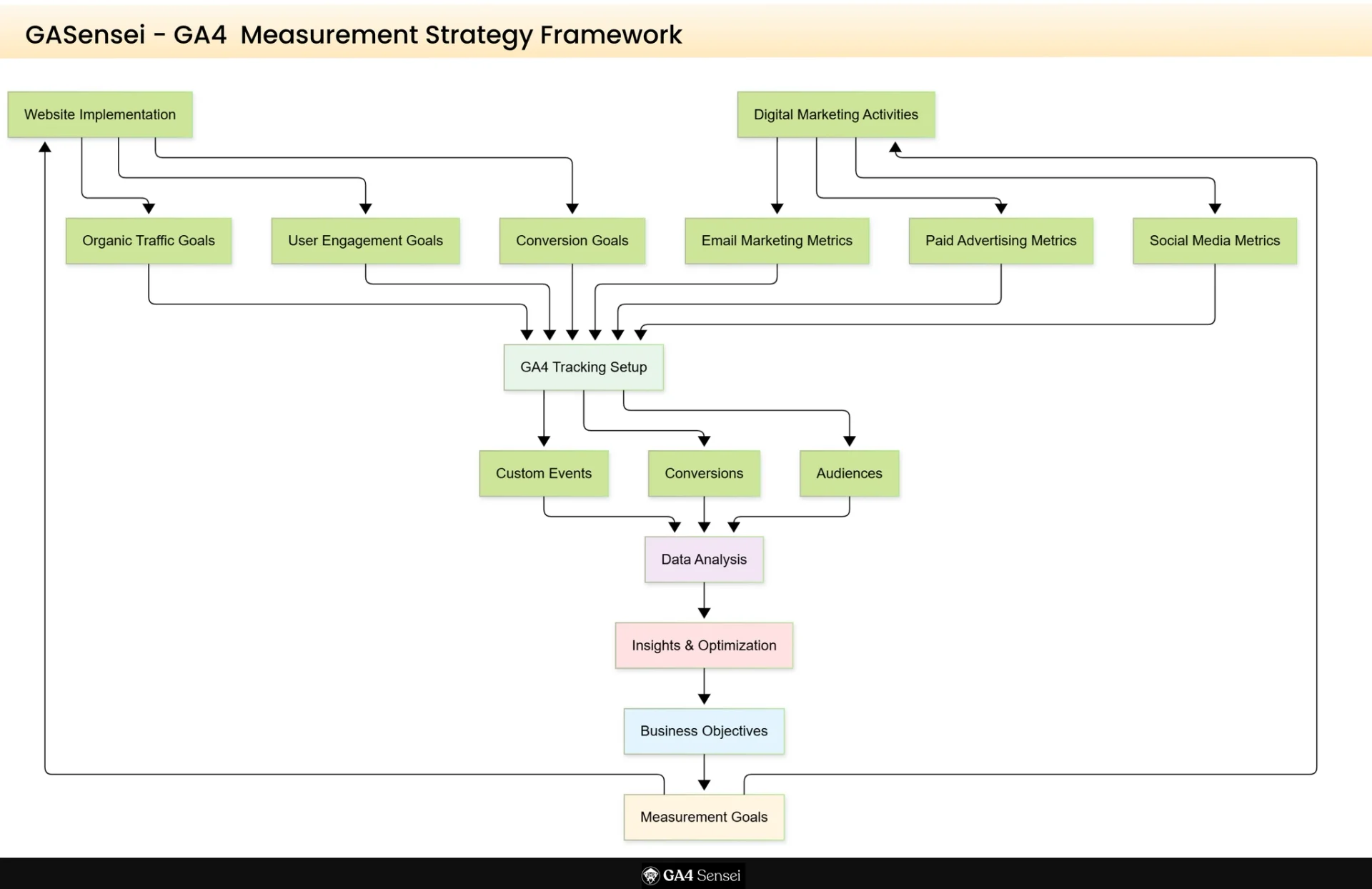
Before you get started with a GA4 audit, you must have your measurement strategy in place.
Your measurement goals are like the coordinates you input into your navigation system - they guide your journey, ensuring you're heading in the right direction. They're the tangible metrics that align with your broader business objectives, helping you gauge the effectiveness of your efforts and chart the course for future strategies.
But here's the catch - your measurement goals can't exist in a vacuum. They need to be in sync with the efforts you've invested in your website's implementation and optimization. They need to account for all your digital marketing activities.
For instance, if you've been focusing on boosting your organic traffic, one of your measurement goals could be to track the increase in organic visitors to your site. If you've been investing in email marketing, you might want to measure the click-through rate of your emails.
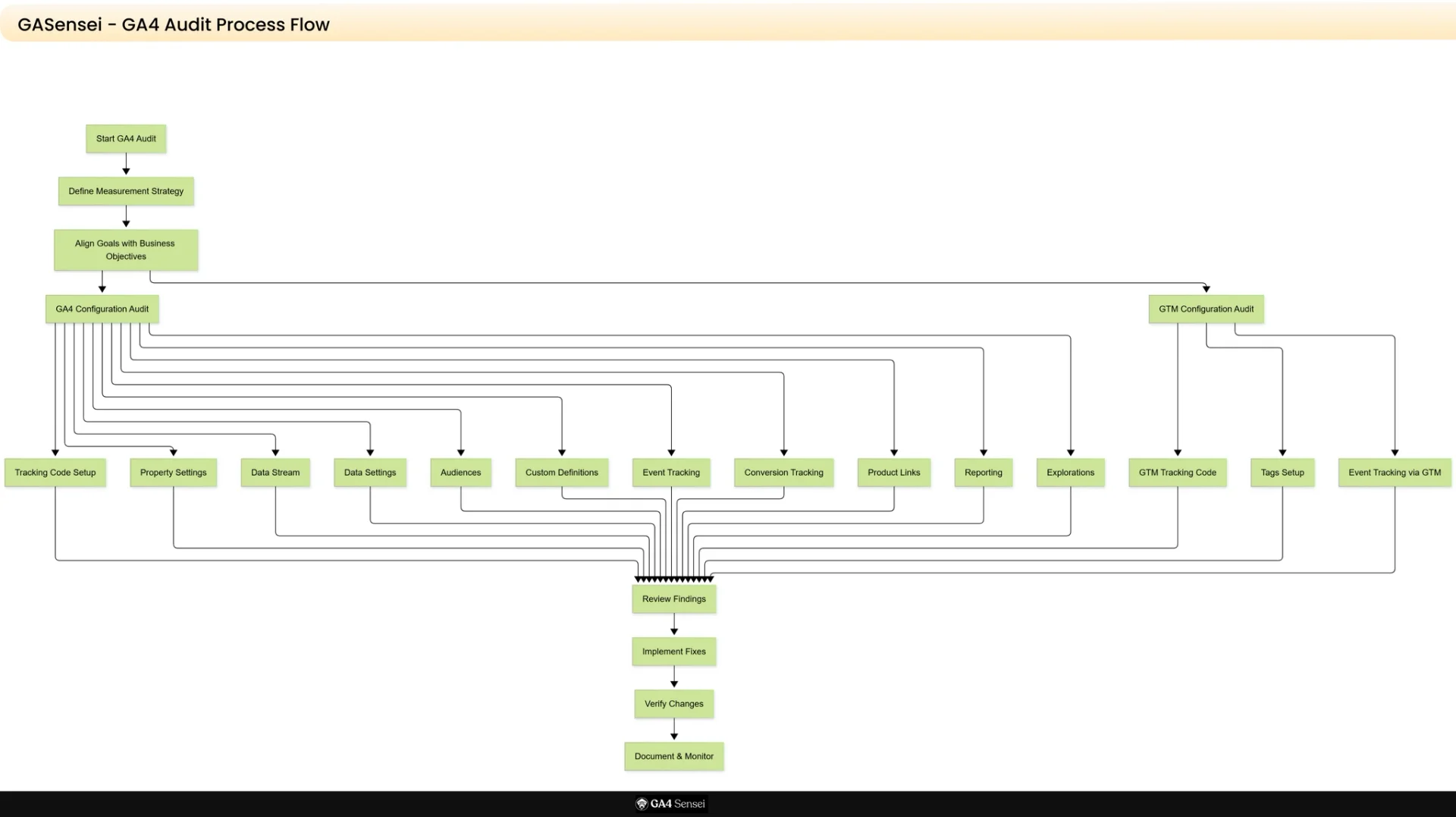
Let’s dive into the GA4 audit process flow, GA4 Sensei has created the process flow which will help you in most optimize way, if you follow our sensei flow for audit you will get best results.
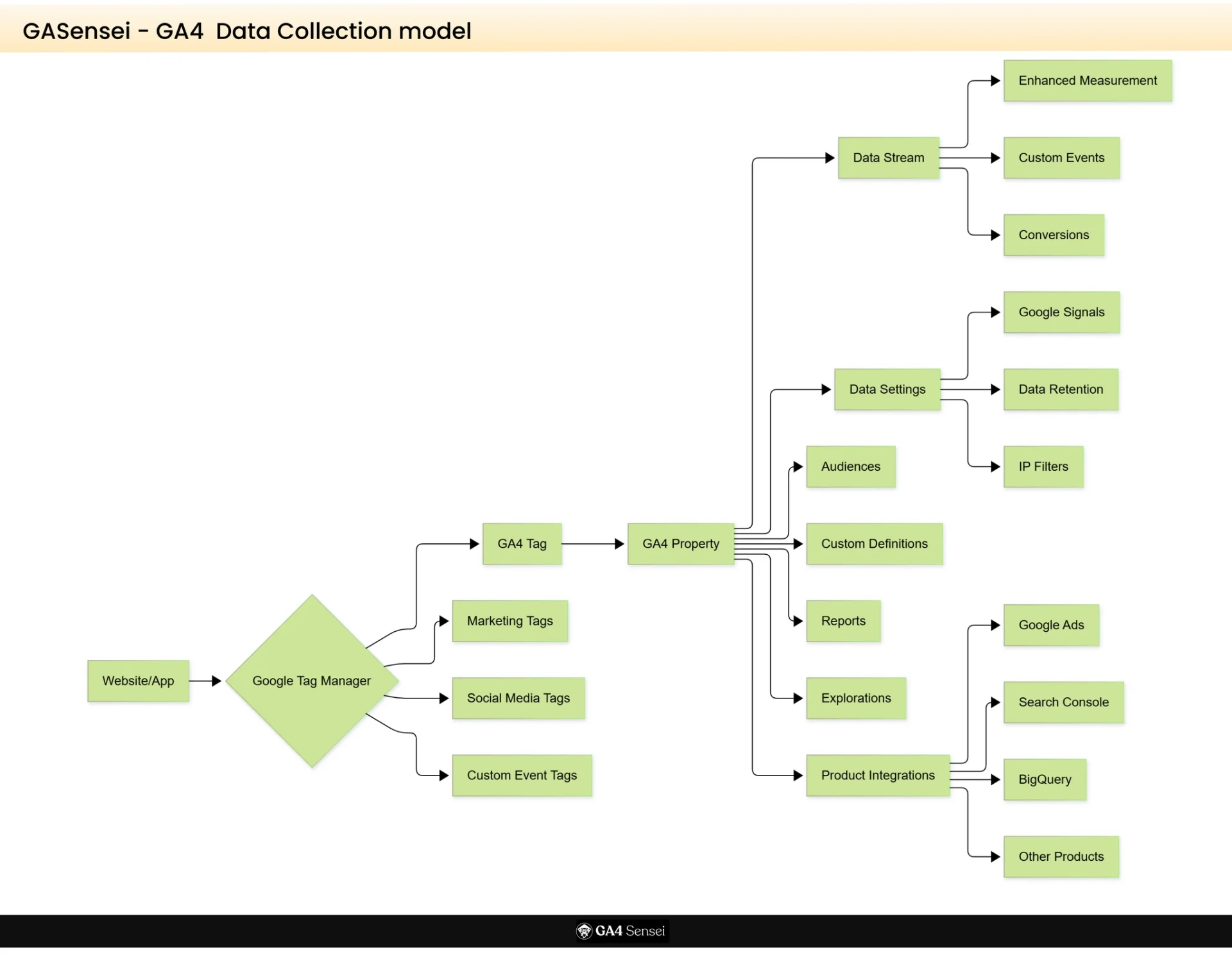
Before even event tracking implementation, it is good to have the data collection model handy with you. Just walk through with below data collection model and execute like this way.
Below is complete check list, go just copy and paste it at your end in your excel work book and everything will be sorted.
Pre-Audit: Measurement Strategy
Define measurement goals aligned with business objectives.
Write and document key performance indicators (KPIs).
Map digital marketing activities to tracking requirements.
Identify organic traffic goals (if applicable)
Define email marketing metrics (if applicable)
Outline conversion paths and customer journey
Install GA4 tracking code on every page.
Integrate Code within Google Tag Manager.
Make sure tracking code appears only once per page.
Make sure code correctly placed in website header.
Make sure that no duplicate tracking codes present.
Property name accurate and descriptive.
Check that Industry category correctly selected or not.
Check Reporting time zone set correctly or not.
Check Display currency configured appropriately or not.
Check Property ownership and admin access verified or not.
If Data stream correctly configured for web/app or not.
Enable the Enhanced measurement.
Check that Stream name clearly labeled or not.
Measurement ID verified or not.
Stream URL matches website domain or not.
Enable the Google Signals data collection.
Check User Data Collection acknowledgment completed or not.
Check Data retention period set to 14 months (or as per business needs).
IP filters applied to exclude internal team traffic or not.
IP filters applied to exclude consultant/agency traffic or not.
Check Default Channel Groupings optimized.
Make sure Attribution settings reviewed
Remarketing audiences set up
"All Users" segment created for 30 days
"All Users" segment created for 90 days
"All Users" segment created for 180 days
Converters segment for 30 days
Converters segment for 90 days
Converters segment for 180 days
Pricing page viewers (30 days)
Pricing page viewers (90 days)
Pricing page viewers (180 days)
Additional custom audiences based on user behavior
Custom dimensions defined and implemented
Custom metrics defined and implemented
Naming conventions are clear and consistent
Scope (event, user, item) set correctly
Documentation of all custom definitions maintained
Existing custom events reviewed and functioning
Login click events tracked
Button click events tracked
Form submission events configured
Scroll tracking events set up (if needed)
Video engagement events tracked (if applicable)
Download events configured (if applicable)
Event parameters properly defined
All conversions reviewed for proper functionality
Form submissions tracked (demos)
Form submissions tracked (contact forms)
Form submissions tracked (gated content)
Email link clicks tracked as conversions
Phone link clicks tracked as conversions
eCommerce tracking enabled (if applicable)
Purchase events configured (if eCommerce)
Conversion values assigned appropriately
Test conversions to verify tracking
Google Ads linked
Google Ads Manager linked (if applicable)
BigQuery linked (if applicable)
Display & Video 360 linked (if applicable)
Merchant Center linked (if eCommerce)
Google Optimize linked (if using)
Google Play linked (if mobile app)
Search Ads 360 linked (if applicable)
Google Search Console linked
Verify data sharing settings for all integrations
eCommerce reports removed (if lead gen website)
Google Search Console reports integrated
Custom reports created for key metrics
Report access permissions configured
Scheduled email reports set up (if needed)
Dashboard created for key stakeholders
Path exploration from homepage to conversions created
Path exploration from key landing pages created
Funnel exploration for checkout process (if eCommerce)
Funnel exploration for conversion processes
User lifetime exploration set up
Cohort analysis explorations created (if needed)
Segment overlap analysis configured
GTM account created and configured
GTM container code installed on every page
Code located in correct position (head section)
Code appears only once per page
Noscript version included in body
GTM preview mode tested successfully
Google Analytics 4 configuration tag set up
GA4 tag fires on all pages
Marketing automation tool tags configured
Facebook Pixel tag set up (if applicable)
LinkedIn Insight Tag configured (if applicable)
Twitter/X conversion tag set up (if applicable)
Microsoft Ads (Bing) tag configured (if applicable)
Microsoft Clarity tag implemented
Third-party marketing tool tags installed
Tag firing rules tested and verified
Form submission events configured
All forms on website tracked
Scroll depth tracking implemented
Email link click events set up
Phone link click events set up
Specific outbound link click tracking configured
Content download events tracked
PDF download tracking enabled
Video engagement tracking set up
Button click events configured
Navigation click events tracked (if needed)
Naming conventions consistent across tags, triggers, and variables
Folders used to organize tags (if needed)
Tag descriptions documented
Version control and notes maintained
Workspace changes published appropriately
User permissions reviewed
Preview and debug mode tested
No conflicting triggers present
A Google Analytics 4 audit isn't optional—it's essential for any business serious about its digital presence. These checks ensure you're no longer flying blind. Your cockpit is calibrated, your instruments are trustworthy, and you can navigate your business toward its destination with confidence.
Regular audits guarantee accurate, reliable data. This empowers you to make informed decisions, reach the right audiences, and grow your online presence. You're now equipped to master your data and achieve your goals.
We are industry expert team working on GA4 and GTM from many years and served many businesses across the world. We can help you out on GA4 Audit and GA4 implementation as well
Connect with us at hello@ga4sensei.com